Collections
Collections provide a rich and sophisticated method of organizing the information you store in Yojimbo. Whether you use the built-in Smart Collections or create your own, Yojimbo works for you.
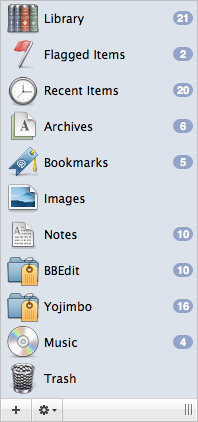
Yojimbo’s built-in Smart Collections dynamically gather items by type (bookmarks, for example), status (unsorted or flagged) and so on. Create your own Tag Collections gather items based on the presence of one or more specific tags; or manually organize items using Custom Collections that you create yourself.
An example of a mix of Smart, Custom and Tag Collections
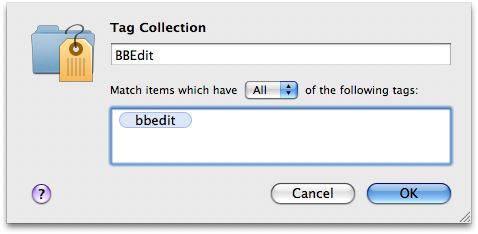
Tag Collections
A Tag Collection is a folder which contains all of the items tagged with certain keywords. Tag Collections can be configured to automatically group items that share all of the tags in the tag list, or any of the tags.
Custom Collections
If you’re the kind of person who likes to have a place for everything and everything in its place, go wild! As always, in Yojimbo it’s completely up to you and you don’t need to use any collections if you don’t care to. Custom Collections are easy to create, just like everything else in Yojimbo.
An item can be in more than one Custom Collection for more sophisticated filing. Use as many, or as few, Collections as you like.
Customizing a Collection
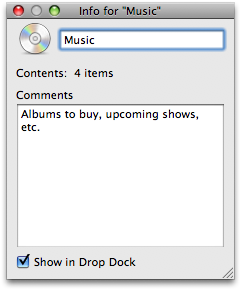
New custom Collections start with a generic folder icon. Using the Inspector, you can paste any picture over the folder icon to personalize it.
Items in Multiple Custom Collections
Custom Collections are simply a convenient way to create your own categories for filing things. You can put an item into as many collections as you like by dropping the item on a Collection or dropping a Collection into the Items Inspector (see below).
Smart Collections
Smart Collections dynamically gather items by type or status:
| Smart Collection Name | What’s In It |
|---|---|
| Library | All of the items you’ve added to Yojimbo |
| Flagged Items | Only the items you have added a flag to |
| Recent Items | The twenty items most recently added to or edited in Yojimbo |
| Unsorted Items | Any items which are not in any custom Collection |
| Untagged Items | Any items which do not have any tags applied |
| Archives | Web Archives and PDFs stored in Yojimbo |
| Bookmarks | All of your stored URLs |
| Images | Pictures, comics, icons, etc. |
| Notes | Entries with text content |
| Passwords | Account passwords, PINs, etc. |
| Serial Numbers | Serial numbers for software or hardware |
| Custom Collections | Groups of items, gathered manually |
| Tag Collections | Groups of items, collected by tag(s) |
| Trash | Deleted items, which remain here until you empty Yojimbo’s Trash. |


